
New version of the operating system will be available for free next Tuesday (5), but Windows 10 remains a viable option for users
Windows 11 is coming. Microsoft has said that the free software update will be released to users next Tuesday (5), and that it can be installed on computers that meet the minimum requirements needed to run the new version.
As well as coming with a redesigned and more modern graphical interface, Windows 11 will also feature support for Android apps and integration with the latest technologies, which will make it easier to play games on PCs.
1. How do I know if my computer is compatible?
Windows 11 requires some hardware resources that are a little more specific and may not be part of the technical specifications of older or simpler PCs. To find out if your computer is compatible with the system, the best way is to use PC Health Check, Microsoft’s official requirements checking tool.
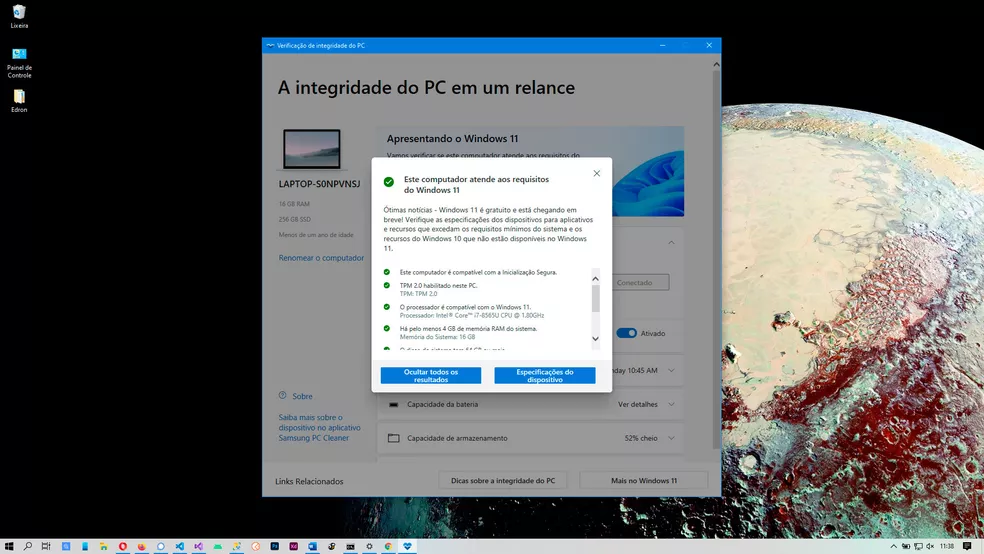
Found on the Windows 11 website, the file is easy to install and use: just run it and it will examine your computer’s hardware and determine whether it is compatible with the new version of the system. If the result is negative, the program will display a diagnosis that clarifies your PC’s problems and limitations.
2. Is the upgrade really free?
Yes, for all Windows 10 users. As long as your computer is compatible, you can update the operating system without any additional licensing costs. Although free, upgrading to Windows 11 does have some requirements: users need to be online to activate the upgrade, and use of the system will depend on a valid Microsoft account.

For those who don’t have a valid Windows 10 license, the upgrade can be done at an extra cost. However, Microsoft has not yet released the final prices for the domestic editions of the product.
3. Do I have a time limit for the free upgrade?
Microsoft has been vague on the subject of Windows 11’s free upgrade window. The most recent information on the subject comes from July, when Microsoft told the press that, although there are no fixed deadlines at the moment, it is possible that a final deadline for the free upgrade will be set in the future.
Microsoft also pointed out that, even if it decides to apply a limit, this date should not be less than a year from the commercial availability of the operating system on the market. In practice, this means that, in the worst case scenario, the free migration to Windows 11 would last until October 2022. The trend, however, is for the deadline to be even more generous.
4. I want to stay with Windows 10. Can I?
Yes, the upgrade is not compulsory. Windows 10 will continue to work as normal, including the right to new updates. The big issue is that Microsoft’s focus will no longer be on the old version, which may result in leaner updates.
Officially, support for Windows 10 is guaranteed until October 2025, the date that marks the 10th anniversary of the platform’s availability. Users should therefore receive improvements, new features and security fixes regardless of the pace of Windows 11 updates.
5. What will happen to my files if I upgrade to Windows 11?
By default, all your files and data will be transferred in the automatic upgrade. The upgrade is similar to the process of upgrading Windows 8.1 computers to Windows 10.
However, it is worth noting that Microsoft is also due to release the Windows 11 ISO. With the final images of the operating system, it will be possible to carry out completely clean installations. Although more laborious, this method yields better performance and can be a more efficient migration option for those who have up-to-date backups.
6. Which edition will I get when I upgrade?
The upgrade will be made to the same edition that you have on your Windows 10 computer. This means that “Windows 10 Home” users, for example, will receive Windows 11 Home. Those who have a license for the “Pro” version will have access to its equivalent in the new operating system.

The differences between the editions are more or less the same: the “Pro” version of Windows 11 will have features more geared towards corporate networks, such as a tool for applying group policies, an Azure directory and a more configurable updates tool, suitable for use in companies.
7. If I don’t like Windows 11, can I go back to Windows 10?
Yes. According to Microsoft, after upgrading to Windows 11, users have a period of 10 days to return to Windows 10 while keeping the files and data on the device. After the 10 days, however, you will need to prepare Windows 10 installation media with an ISO image of the system and format the computer, performing a clean installation of the OS.
At least so far, Microsoft has not said whether it will offer any simple way of reversing the upgrade in the long term for those who prefer to return to Windows 10. In previous releases, this type of measure was possible.
8. Is it better to upgrade or buy a new PC with Windows 11?
You don’t need a new computer to run Windows 11 – if your system is compatible. However, if your current machine doesn’t offer the recommended minimum, you may need to invest in upgrades to meet the hardware requirements needed to run the new version of the operating system.

In cases where the incompatibility is due to the absence of the TPM security module, Microsoft says that the user can install Windows 11 on the PC. The only major restriction is that, in these cases, the computer will not have access to security updates.
Via Techtudo